PSD to PDF and PDF to PSD: What Actually Happens to Your Layers
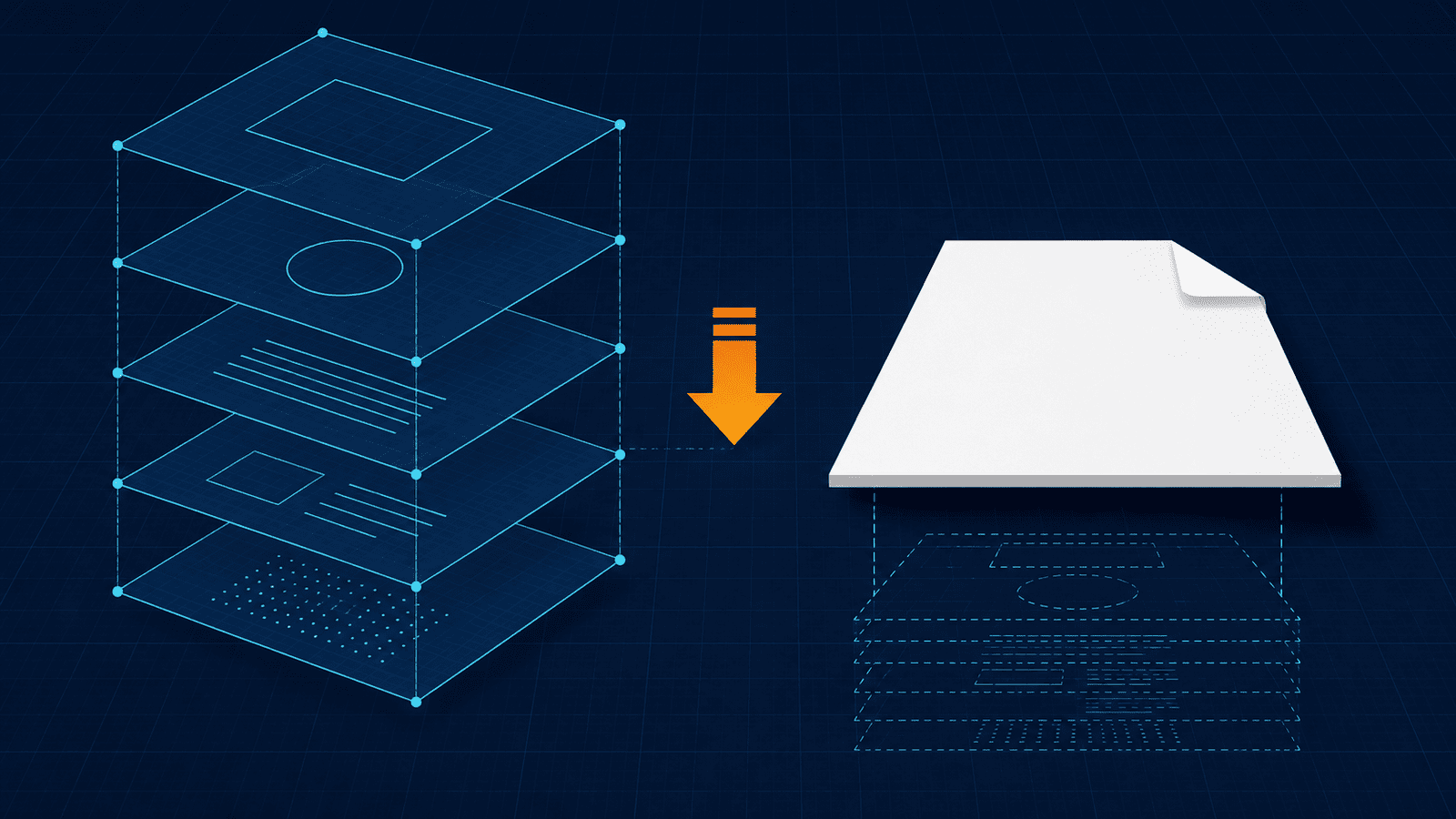
Search for a PDF-to-PSD converter and you'll find a promise repeated across dozens of sites: convert your PDF and get fully editable Photoshop layers back. Open it up, click your text layer, retype the headline.
It isn't true — and understanding why saves you from a frustrating afternoon. The two conversion directions between PSD and PDF are not mirror images of each other. One is genuinely straightforward. The other is fundamentally lossy, no matter which tool you use.
Here's what each direction really does.
The core mismatch: "layers" mean different things
A PSD is a workspace. It stores your entire editing state: every raster, text, shape and adjustment layer, with positions, blending modes, opacity, masks and effects, all independently editable. That's the whole point of the format — decisions stay reversible.
A PDF is a finished page. It stores objects at fixed positions in a defined stacking order. Text is text, images are images, vectors are vectors, but there's no concept of "the headline layer" you can grab and move.
Confusingly, PDFs do have something called layers — technically Optional Content Groups. But these are visibility switches, not a stacking hierarchy: they let a viewer toggle content on and off (think CAD drawings or multilingual print files). They don't map onto Photoshop's layer model, and creative applications generally read a PDF as a flat file regardless of whether OCGs are present. This is why "just convert the PDF back to layers" doesn't work — the structure Photoshop needs was never in the file.
Keep that asymmetry in mind and both directions make sense immediately.
Direction 1: PSD → PDF (the straightforward one)
This is the direction most people need, and it works well.
Your layered PSD is flattened into a fixed page. All visible layers composite down into the finished artwork exactly as it appears on your Photoshop canvas, and that becomes the PDF.
Why designers do this constantly:
- The recipient doesn't need Photoshop. PSD files essentially require Adobe software (or a compatible editor) to open. A PDF opens in any browser, on any phone, on any operating system.
- It's the print handoff standard. Print shops expect PDFs.
- File size drops dramatically. PSDs balloon because they store every layer's full data. The flattened PDF carries only the composite.
- It looks identical everywhere. That's the entire purpose of the format.
What you give up: editability. The PDF has no layers to return to. That's not a problem in practice — the workflow is keep the PSD as your master, send the PDF as the deliverable. Never treat the PDF as your archive copy.
Worth knowing: hidden layers don't appear in the output (only what's visible composites), and if your design uses spot colors or CMYK for print, confirm the color handling matches what your printer asked for before sending.
Direction 2: PDF → PSD (the honest version)
Here's where the marketing claims fall apart.
A PDF-to-PSD conversion rasterizes the page: it renders the PDF's appearance into pixels and wraps them in a Photoshop file. What you typically get is one flattened layer per page — a faithful image of the page, opened and ready in a Photoshop workspace.
That's genuinely useful. It's better than a JPG, because you land in a real PSD canvas where you can immediately add adjustment layers, masks, retouching and new text on top without flattening anything first. For a lot of real work — mocking up changes, retouching a page, building on top of an existing design — that's exactly what you need.
What it is not is a recovery of the original design. The text isn't editable text. The logo isn't a shape layer. The photo isn't separable from the background. Those distinctions existed in whatever file created the PDF, and they didn't survive the export.
Two practical consequences:
Resolution is locked at conversion time. A PDF's vector content can render at any size, but once it's a PSD it's pixels. Convert at the resolution you actually need — around 300 DPI for print output, 72–150 for screen. Wanting a larger version later means converting again from the PDF, not upscaling the PSD.
Multi-page PDFs become multiple files. Photoshop isn't a page-layout application, so a 20-page PDF produces 20 separate PSDs rather than one multi-page document.
The one real exception
There is a narrow case where more than rasterization is possible: an editor that parses the PDF's underlying objects can rebuild some of them as native Photoshop elements — turning PDF text objects into text layers and vector paths into shape layers. Photopea, a browser-based editor, is known for attempting this.
Even then it's a reconstruction, not a recovery. Results vary with how the PDF was produced, complex documents come through unevenly, and the layer organization of the original design is gone regardless. It's worth trying if editable text is the specific thing you need. Just don't expect your designer's tidy layer stack to reappear.
So how do you actually get the layers back?
You don't, from the PDF. Your options, in order of how much they'll cost you:
- Ask for the source file. Whoever made the PDF has the PSD, AI, or INDD it came from. One message beats an afternoon of conversion attempts.
- Try an object-parsing editor if you only need the text editable, accepting mixed results.
- Rasterize and rebuild. Convert to PSD, then manually recreate the elements you need to change on new layers above the flat page. For small edits — swapping a headline, changing a price — this is often faster than it sounds.
- Rebuild from scratch if the design needs substantial changes. Sometimes the honest answer.
Which direction do you need?
| Your situation | Direction |
|---|---|
| Sending a design to a client or colleague | PSD → PDF |
| Delivering artwork to a print shop | PSD → PDF |
| Archiving a finished design for viewing | PSD → PDF (keep the PSD too) |
| You have only a PDF and need to retouch or build on it | PDF → PSD |
| You need the original's editable text and layer stack | Neither — request the source file |
Reading converter claims critically
Because this comes up constantly, two claims to treat with suspicion:
"Converts PDF to fully editable layers." As covered above, the layer structure isn't in the PDF to recover. A tool may rebuild some text and vector objects; none can restore the original design's layer organization.
"PSD to PDF preserves your layers." Flattening is what PSD-to-PDF conversion does. Some tools can write Optional Content Groups into a PDF, but as established, those aren't Photoshop layers and won't reopen as an editable stack.
Neither claim means a tool is bad at its job. They just describe something the file formats don't permit.
Convert in either direction
PDFEquips handles both conversions in the browser — no Photoshop, no installs.
👉 PSD to PDF — flatten your design into a share-ready, print-ready page.
👉 PDF to PSD — get your page into a Photoshop workspace to build on.